
An A2L is an ASAP2 symbol file (the ASAM standard) that describes the maps inside a ROM — each one’s name, address, axes, data type, scaling and units. Importing an A2L turns the raw bytes of a section into named, labelled maps you can open in the map editor. Open it from Collections › Import › Import A2L Symbol File.
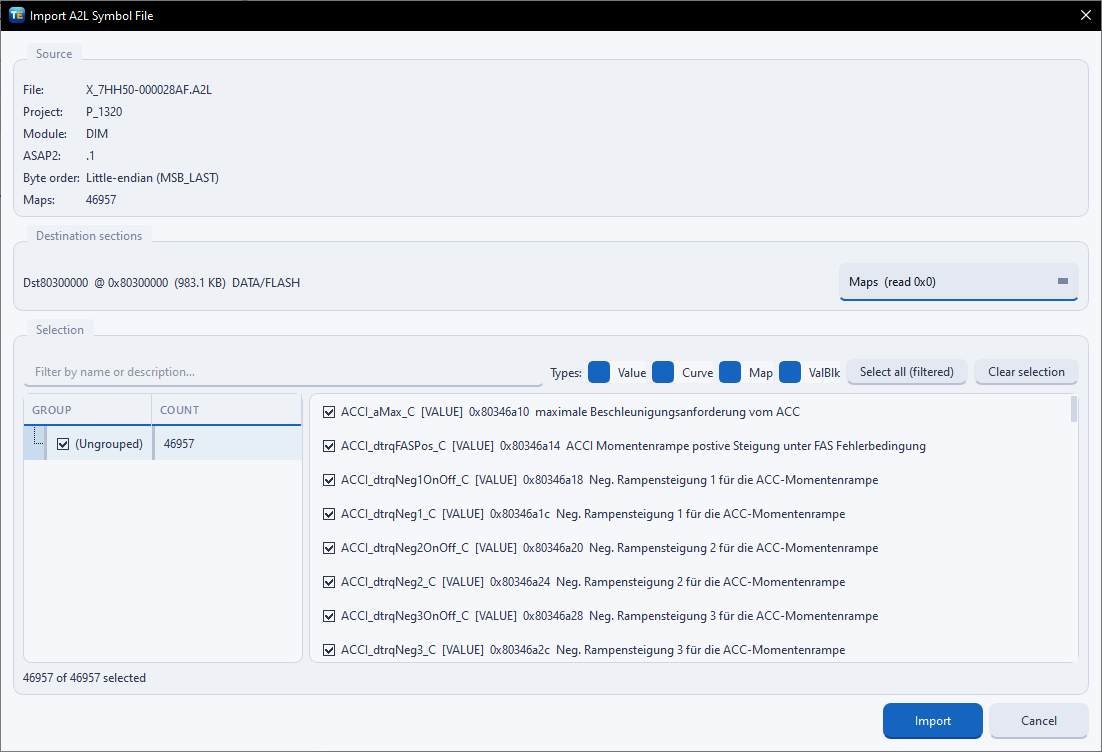
When you pick an A2L the dialog parses it and shows what it found: the Project and Module names, the ASAP2 version, the memory segments it describes and the total map count. This is your confirmation that the file was read correctly before you import anything.
An A2L can describe several memory segments, so you decide how they land in your collection:
Under Destination sections you route each segment to a target: an existing section (Tuning Editor matches one automatically by its read offset) or . Set the default Byte order for the imported maps — Big-endian (MSB_FIRST) or Little-endian (MSB_LAST).
You rarely need every map, so the Maps list lets you pick a subset. Use the group tree to browse, the Filter by name or description box to narrow it, and the Types filter to show only the kinds you want — Value (a single number), Curve (a one-dimensional table) or Map (a two-dimensional table). Select all (filtered) ticks everything currently shown, and Clear selection starts over; a count keeps track of how many you have chosen. Click Import to bring them in.
Warning — the A2L must match the ROM it describes (same software version). If it does not, the addresses will not line up and the maps will point at the wrong bytes.
The chosen maps appear as named entries in the collection’s map list, ready to open in the map editor. Tuning Editor remembers your last selection for that A2L, so re-importing later to add a few more maps is quick.
Tip — import only the maps you actually plan to touch. A tidy map list is far easier to work in than one with thousands of entries, and you can always re-import more.
Go Back to the Sections

A hex editor built specifically for editing EEPROM data in automotive ECUs. With real-time checksum correction, side-by-side file comparison, and plugin support for automated tasks it's the ultimate tool for professionals.

All-in-one application for tuning experts preparing vehicles for track use. Designed for professional workshops, it simplifies the deactivation of non essential components to unlock true performance.

A free collection of checksum correction plugins for TunerPro that ensures safe ECU tuning. Automatically verify and update file checksums for reliable vehicle performance.